Event Sponsorship Packages: A Tiered Template That Sells Digital Placements
Turn your app into tiered sponsor inventory that renews itself
May 17, 2026
By The Confi Team
Most event sponsorship packages look the same: a logo on the website, a mention in the program, maybe a banner in the lobby. Sponsors have seen it all before — and they're increasingly harder to close on it.
Your conference app gives you a completely different kind of inventory to sell. Here's how to structure it into packages that sponsors will actually pay for — and renew next year.
What Is an Event Sponsorship Package?
Event sponsorship package: a structured set of benefits — digital placements, physical visibility, and audience access — offered to a corporate sponsor in exchange for event funding, typically sold in 3–5 price tiers.
The package tells a sponsor exactly what they get for their money. A well-built package has a clear tier name, an itemised list of inclusions, an audience reach estimate, and a price. Think of it as the contract before the contract.
The shift happening right now is that the most valuable inclusions are no longer physical — they're digital. And the most valuable digital placements are inside the conference app that every attendee has on their phone.
A 3-Tier Conference Sponsorship Package Template
Three tiers is the standard for most conferences. Fewer than three gives sponsors too little to choose from; more than four creates decision paralysis and dilutes the exclusivity of your top tier.
Here's how to map each tier to Confi's in-app placements. Use this as your sponsorship packages template and adjust names and prices to fit your event.
Bronze — Entry Tier
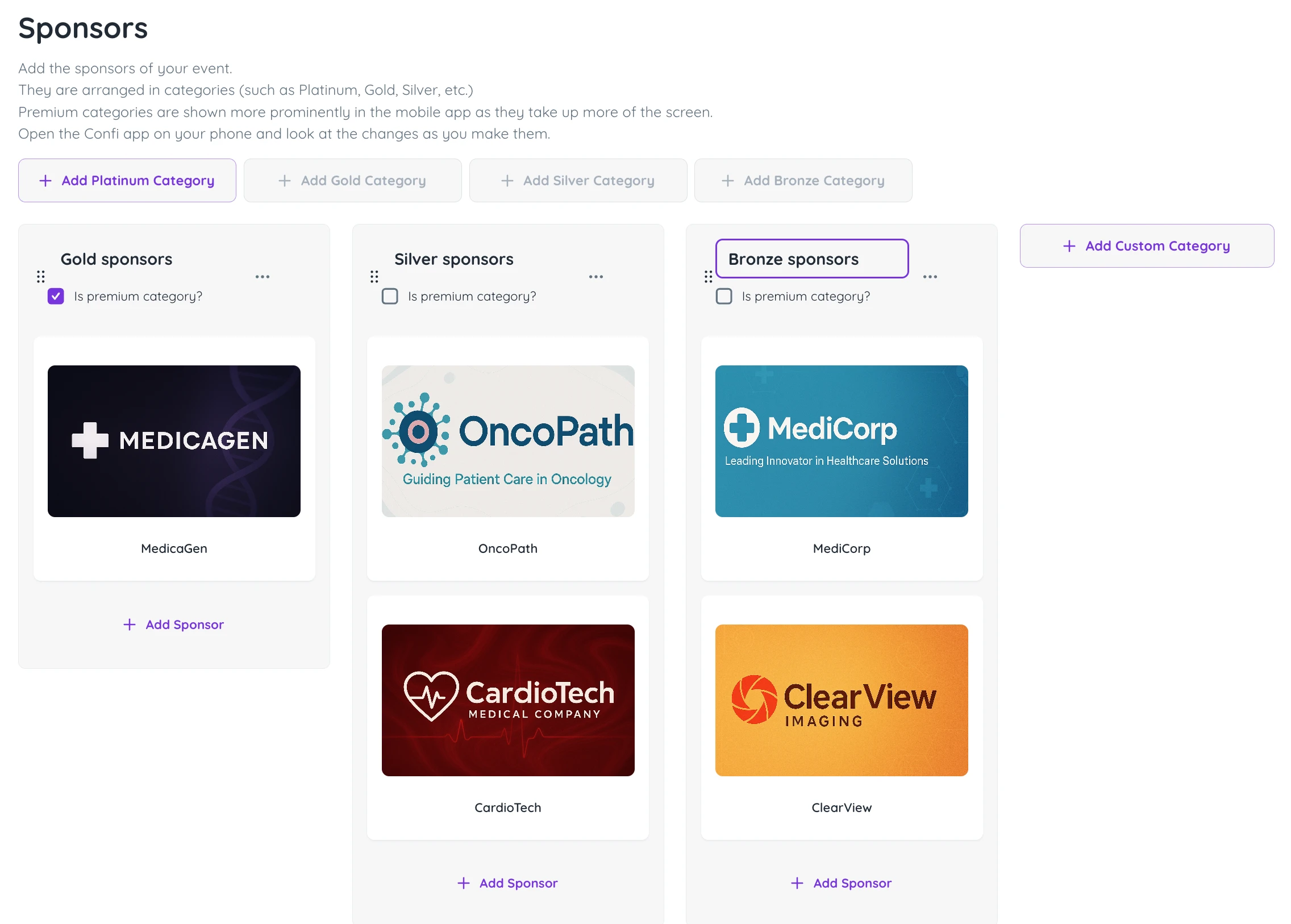
Bronze sponsors get visibility without premium placement. In Confi, that means a dedicated listing in the Sponsors section — their logo, company name, description, website link, and any downloadable resources. Their card appears in the standard two-per-row display alongside other Bronze-level sponsors.
Sponsor profile in the app (logo, bio, website, resources)
Listed under the Bronze category in the Sponsors section
Physical add-on: logo on name badges or printed programme
Silver — Mid Tier
Silver sponsors get everything in Bronze, plus their name attached to a session in the agenda. That session appears on their sponsor profile and is visible in the conference schedule — every attendee who opens that session sees the sponsor's branding. Sponsors linked to a session see up to a 70% increase in profile clicks compared to sponsors with a listing only.
Everything in Bronze
One sponsored agenda session (shown on the sponsor profile and in the schedule)
Physical add-on: booth space in the exhibition area
Gold — Premium Tier
Gold is your most valuable inventory. Premium sponsors in Confi get a full-width card in the Sponsors section — significantly more prominent than the two-per-row Bronze and Silver display. They also get a placement in the news and feed screen, the first thing attendees see every time they open the app.
Attendees open the conference app 6–8 times per day during the event. Sponsors on the news and feed screen experience a 50% increase in clicks compared to standard in-app placements. Add a sponsored push notification to the Gold package and you have a placement that reaches every attendee's lock screen — impossible to miss.
Everything in Silver
Premium full-width display in the Sponsors section
News / feed screen banner (50% higher click rate vs. standard placements)
One sponsored push notification to all attendees
Physical add-on: premium booth, presenting sponsorship of a keynote
What Sponsors See in the App
Walking a potential sponsor through the attendee experience is one of the fastest ways to close the deal. Here's what each placement actually looks like on the phone.
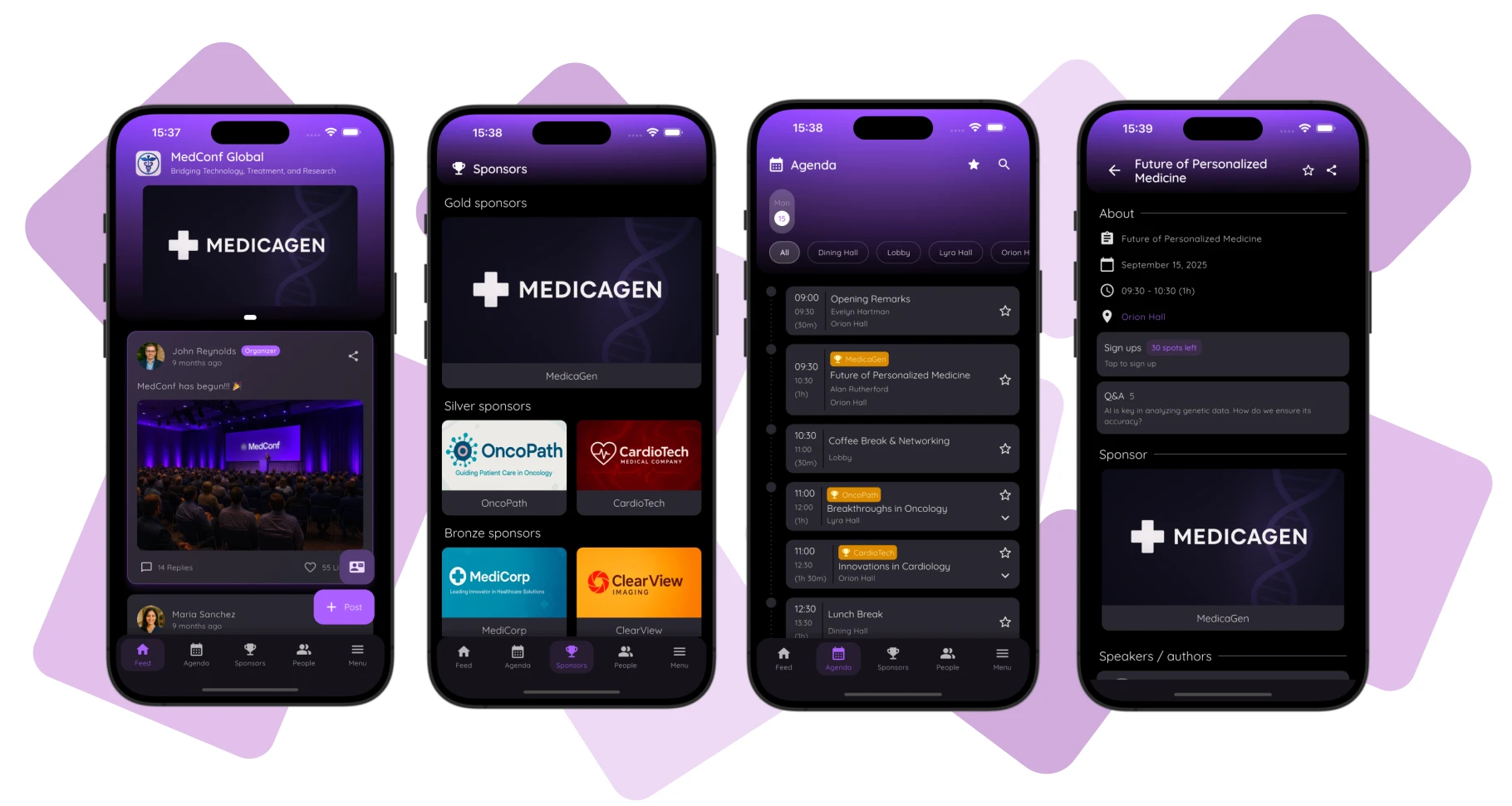
The news and feed banner sits at the top of the screen every attendee opens first. There is no scrolling past it — it's the first pixel they see when they launch the app.
The sponsored session shows up in the agenda with the sponsor's branding on the session card. Attendees who tap it are taken to the full sponsor profile — their description, website link, and downloadable materials — without ever leaving the app.
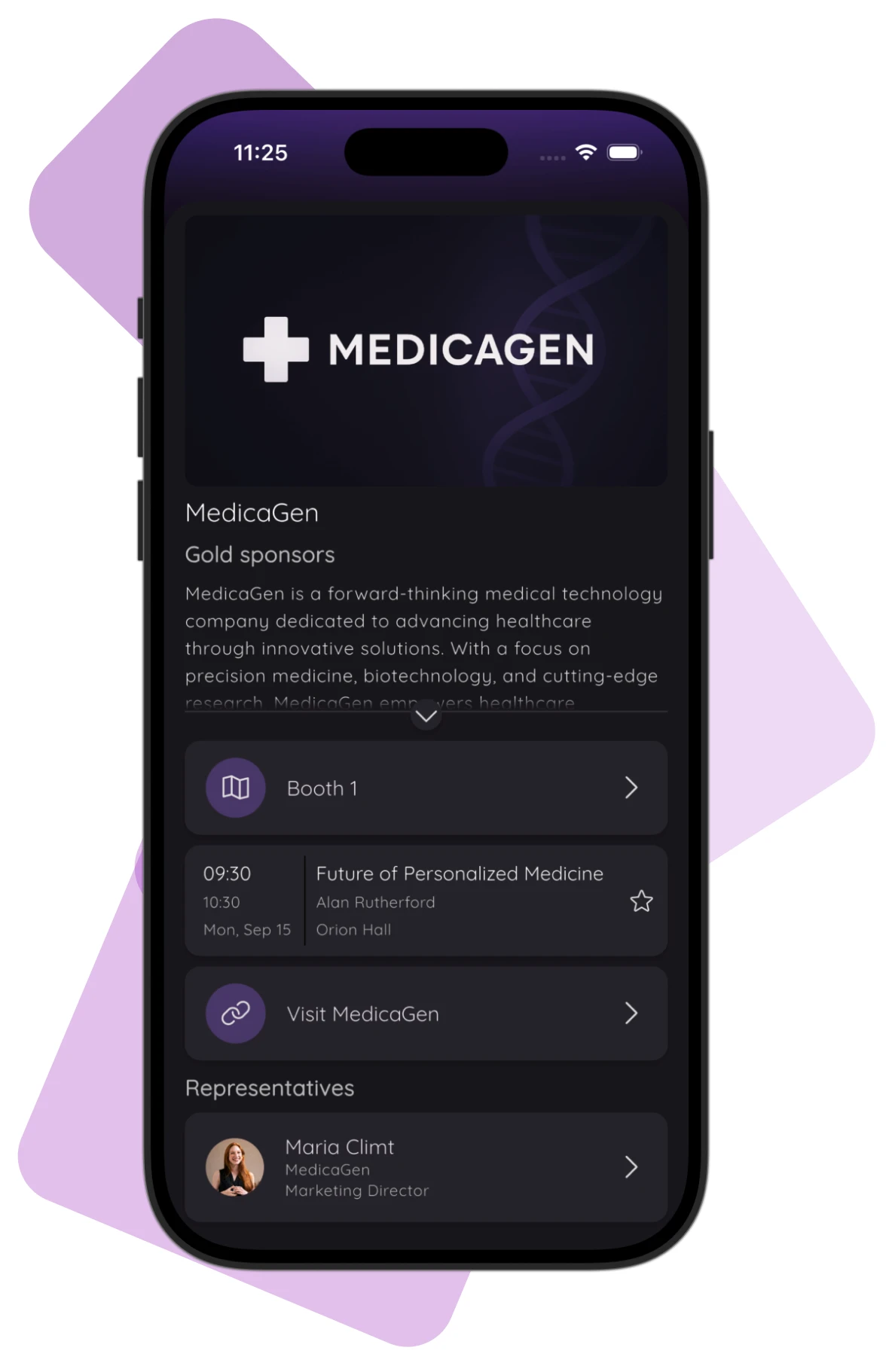
The sponsor profile at any tier functions as a permanent digital stand. It's accessible before the event opens, during every session break, and after the event ends — long after the exhibition hall has closed.
How to Set Up Sponsor Tiers in Confi
In the Confi admin portal, sponsor tiers are built as sponsor categories. Navigate to the Sponsors section and create a category column for each tier — Gold, Silver, Bronze. You can drag and drop categories to control the order in which they appear in the app.
For Gold tier (and any other premium tier you want to highlight), enable the Premium toggle on that category. Premium categories display their sponsors in a full-width format — one per row — giving them significantly more visual weight than the standard two-per-row display used for Silver and Bronze.
To link a sponsored session to a sponsor, assign it in the Agenda section — it will automatically appear on that sponsor's profile page. News banners and push notifications are managed through the Feed section, where you control the content, timing, and whether each post is also sent as a push notification.
How to Price Your Digital Sponsorship Packages
Work backwards from your event's total sponsorship revenue target. A practical starting ratio: Gold should represent 40–50% of that target, Silver 30–35%, and Bronze the remaining 15–25%.
Digital placements justify higher prices than physical ones because you can back them with data. When a sponsor asks why your Gold package costs what it does, you show them click-through rates and notification open counts — not just an attendance estimate and a banner photo.
Most Confi clients find that their Gold and Silver packages fully offset the platform cost. The Bronze tier then becomes a low-barrier entry point for smaller sponsors who can grow into higher tiers at the next event.
Presenting Your Packages to Sponsors
The most common objection you'll face is: "How do we know it actually works?" The answer is data. Every Confi placement is tracked — profile views, session clicks, notification opens, and feed banner interactions. You're not selling a banner placement; you're selling a documented audience touchpoint with a data report attached.
For a deeper look at how to prove ROI to sponsors with in-app data, see our guide on maximising event sponsorship revenue. It covers exactly which metrics to pull and how to present them in a renewal conversation.
One practical tip: include a mockup of the Gold placement in your sponsorship proposal — what it looks like on a phone, which screen it appears on, and how many times per day an attendee will see it. Sponsors who can visualise the placement are far easier to close than sponsors reading a line in a PDF.
Frequently Asked Questions
What should be included in an event sponsorship package?
A complete event sponsorship package includes a tier name, a curated list of inclusions (digital and physical), an estimated audience reach, and a clear price point. For conferences using a mobile app, digital inclusions — such as in-app sponsor profiles, sponsored agenda sessions, news feed banners, and push notifications — are the highest-value items in any package because they deliver measurable engagement data that physical placements cannot match.
How do you structure sponsorship tiers for an event?
Most conferences use 3 tiers — Bronze, Silver, and Gold (or equivalent names). Each tier should offer at least 3 distinct inclusions, with digital in-app placements as the primary differentiator between levels. A full-width news feed banner slot or a push notification works well as a Gold-tier exclusive because it reaches every attendee at their highest-engagement moment.
What is a good price for event sponsorship packages?
A practical starting point is to size your top tier at 40–50% of your total sponsorship revenue target, your middle tier at 30–35%, and your entry tier at the remaining 15–25%. Digital in-app placements justify higher prices than physical banners because sponsors receive click-through data, session interest tracking, and notification open rates they can show their own management.
How do you create a digital event sponsorship package?
A digital event sponsorship package maps each sponsor tier to specific in-app placements. In Confi, Bronze tier sponsors receive a listing in the Sponsors section; Silver tier sponsors also own a sponsored agenda session visible on their profile and throughout the schedule; Gold tier sponsors additionally receive a full-width news feed banner and the ability to send a push notification to all attendees. Configure each tier as a sponsor category in the admin portal and toggle Premium display for Gold and above.
How can a conference app increase sponsorship revenue?
A conference app increases sponsorship revenue by turning passive logo placements into active, trackable touchpoints. In Confi, sponsors placed on the news and feed screen experience a 50% increase in clicks compared to standard in-app placements, while sponsors linked to a session see up to a 70% increase in profile clicks. Organizers can share these numbers with sponsors as proof of ROI, making package renewals significantly easier.
Ready to build your first digital sponsorship package?
Get in touch
© 2025. All rights reserved