Event Attendance Tracking App: Know Who Attended Every Session, Then Issue Certificates
From room code to signed certificate
November 14, 2026
By The Confi Team
Event attendance tracking is recording which attendees were at each session of your event, beyond who arrived at the venue. An event attendance tracking app does it with a code on the room’s screen that attendees scan, or with staff scanning each attendee’s QR code at the door. In Confi, those records then fill in each attendee’s certificate of attendance, with their sessions and hours.
Session attendance tracking: recording which attendees were present at each session of an event, as opposed to check-in, which only records arrival at the venue.
Event Check-In vs. Tracking Conference Session Attendance
Check-in tells you who came to the event; session attendance tells you which talks they sat in. Most events need the first, and our guide to checking people in at the door covers it. Session attendance matters when someone needs proof of what an attendee actually attended.
Continuing education. Medical, legal and other professional conferences give CPD hours, CME credits or CE credits, and attendees need a certificate that lists them.
Academic conferences and training days, where a certificate of attendance goes into a portfolio or an expense claim.
Next year’s programme. Real turnout per session shows which topics and rooms worked, and gives sponsors of a session a number to look at.
Ways to Track Event Attendance
There are four common ways to track event attendance, and they differ in how much staff and hardware each room needs.
Sign-in sheets and an Excel template
A sheet by the door costs nothing and everyone knows how it works. Someone then types the names into an event attendance tracking Excel or Google Sheets template, adds up the hours and makes the certificates. That is fine for one room and a few dozen people, and it gets long with several rooms over two days.
Staff scanning badges at the door
Staff scan each attendee’s badge or app QR code as they walk in. It is the most reliable record, and it needs a person at every door for the first minutes of every session.
A room code attendees scan themselves
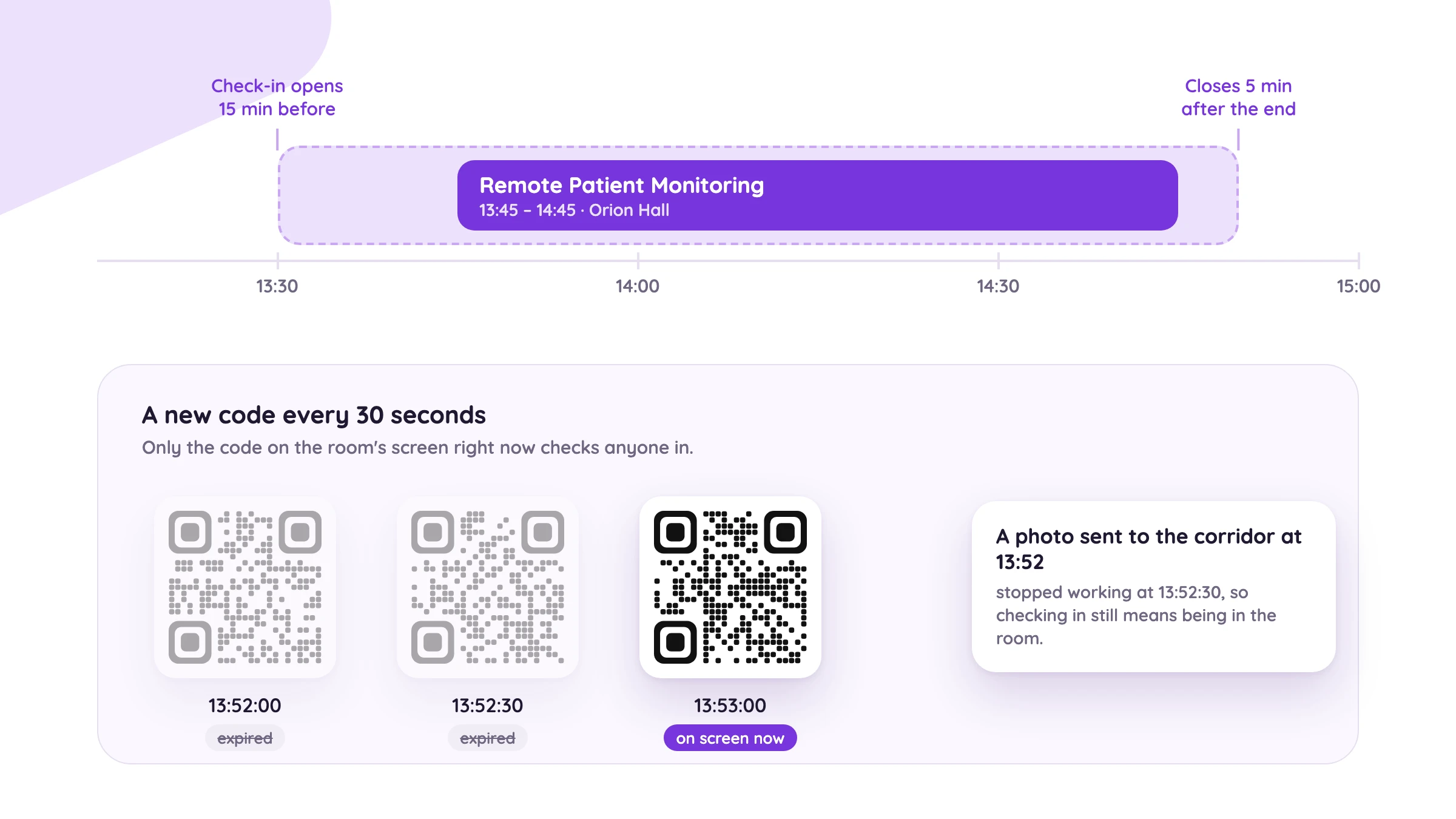
A screen in the room shows a QR code and attendees scan it with their phone. Nobody has to stand at the door. The code needs to change often, so a photo of it sent to a colleague in the corridor stops working.
Beacons and RFID
Event attendance tracking software from vendors such as Crowd Connected uses beacons or RFID badges to pick attendees up as they enter. It needs no action from anyone, and it needs hardware in every room and badges for every attendee.
How Session Attendance Works in Confi
In Confi, attendees scan a code on the room’s screen as they come in, and every session they attend adds to the hours on their certificate. Any projector, TV or tablet in the room can show the code, and attendees scan it with their phone camera or the Confi app.
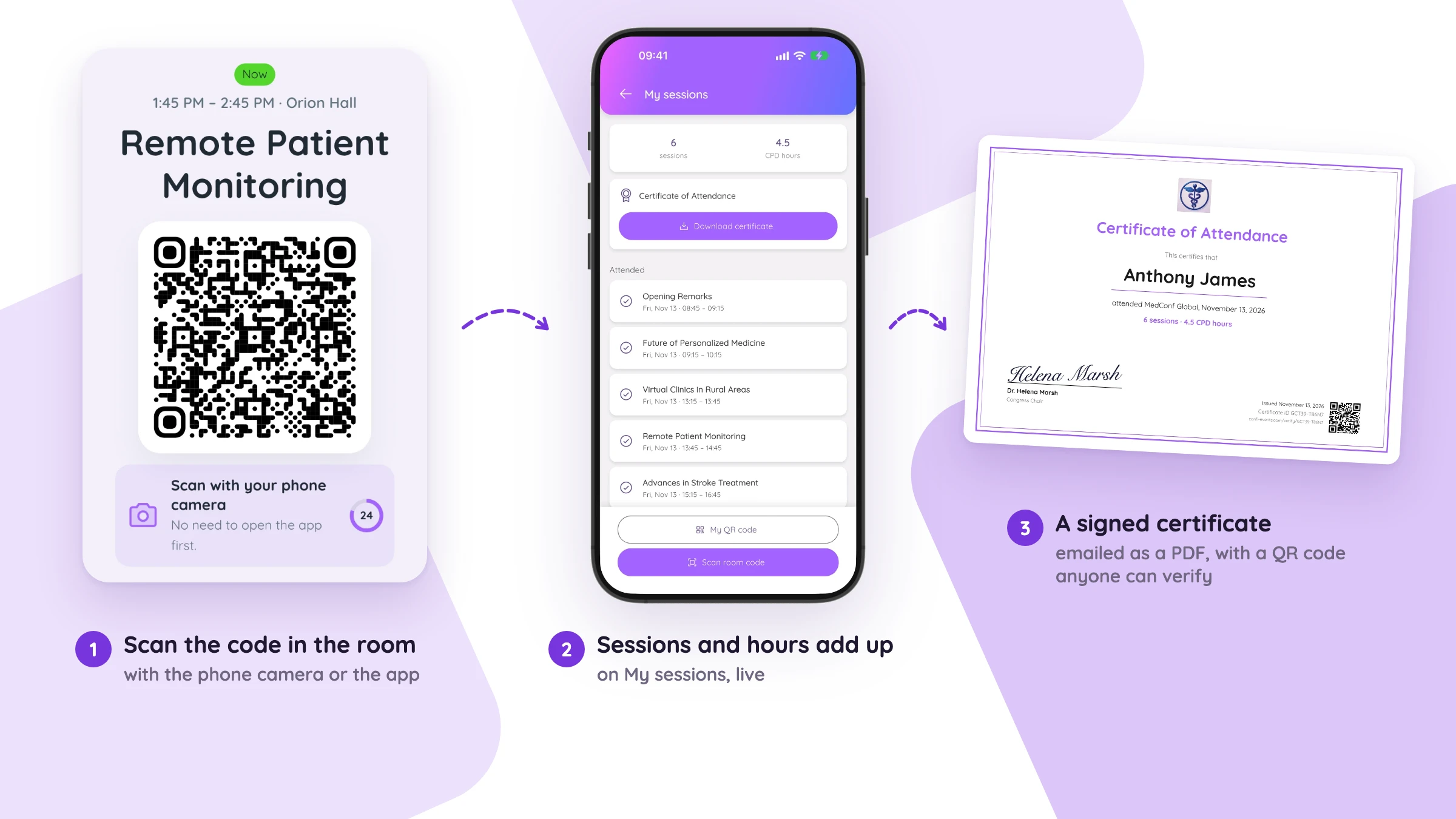
Attendees see their sessions and hours add up on My sessions as the day goes on, so nobody has to email you on Monday asking whether the afternoon workshop counted.
Why a room code can’t be shared
The code on the screen changes every 30 seconds, and a session only takes check-ins from 15 minutes before it starts until 5 minutes after it ends. A photo of the code sent to someone in the corridor stops working before they can use it.
Staff scans for everyone else
Your team scans the attendee’s QR code in the app, or the ticket QR code of a guest without the app, from any phone. Events whose accrediting body wants every attendance confirmed by a person can use staff scans alone.
Certificates of Attendance, Filled In from the Attendance Data
Confi turns the attendance records into a signed certificate of attendance for every attendee, with their name, sessions and hours already on it. You can ask for a minimum number of sessions or hours, and call the hours whatever your accrediting body does, such as CPD hours or CME credits. Parallel sessions count their time once.
After the last session, attendees download their certificate from My sessions, and you can email everyone who qualifies a PDF with your logo, colors and signature. Events that don’t track sessions can still give every attendee a certificate with their name.
Certificate of attendance template: what to put on it
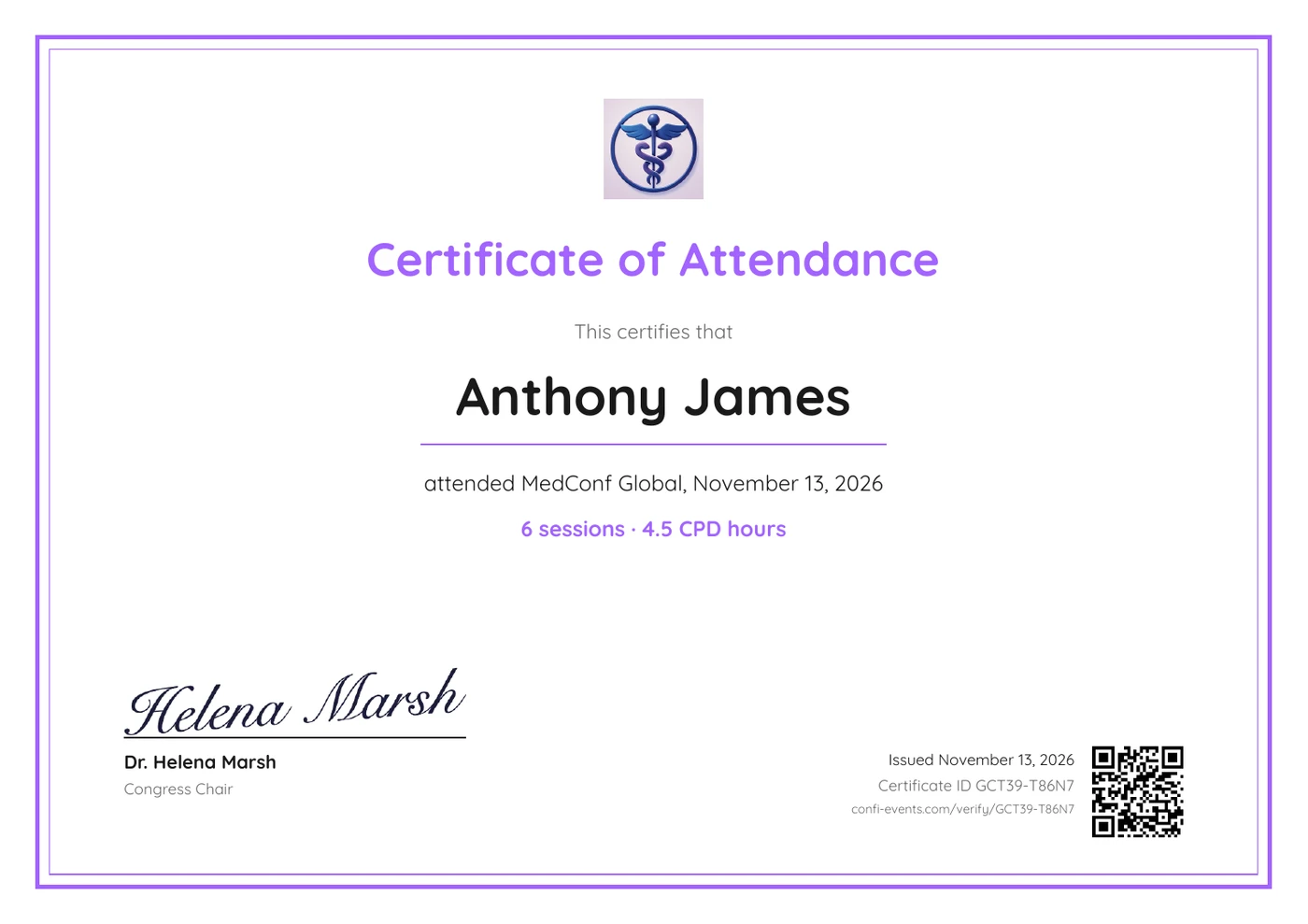
If you are making certificates from a Word template, here is what a certificate of attendance for a conference needs:
The title, usually Certificate of Attendance, and your logo
The attendee’s full name, spelled the way they registered
The event name and date
For continuing education, the sessions attended and the total hours or credits
The signer’s name, title and signature
An issue date and a certificate ID that someone can check
Sample text: “This certifies that Anthony James attended MedConf Global, November 13, 2026. 6 sessions, 4.5 CPD hours.” Confi fills this in for each attendee and adds an ID with a QR code.
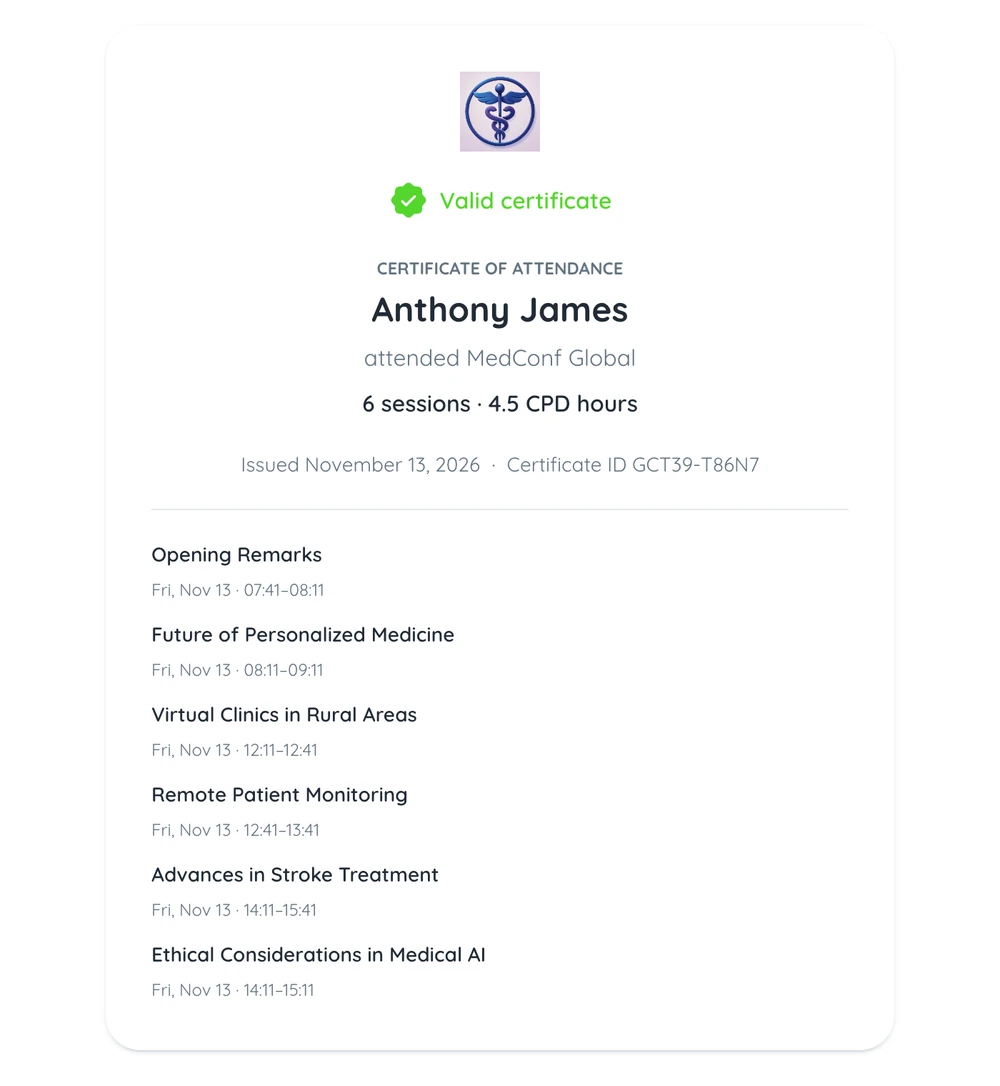
The QR code opens a public verify page at confi-events.com/verify, where an employer or accrediting body can see who the certificate was issued to and which sessions it covers.
Set Up Attendance Tracking and Certificates in 5 Steps
Turn on attendance tracking. In the Confi admin portal, choose room codes with staff scans, or staff scans only.
Put a room screen in each room. Open the room’s screen link on its projector, TV or tablet. It needs no sign-in.
Choose which sessions count. Every session takes check-ins and breaks do not, unless you change it.
Set up the certificate. Add an optional minimum of sessions or hours, name the hours, for example CPD hours, and add the signer.
Send the certificates. After the last session, attendees download theirs in the app and you email everyone who qualifies a PDF.
Our session check-in and certificates guide walks through each step, including staff access and what to do on the day.
One thing to check with your accrediting body: Confi records attendance when an attendee comes in and counts each attended session’s full length. There is no exit scan, so if your CPD or CME provider needs time-in and time-out, ask them before you rely on the hours.
Running a conference with CPD or CME hours? We can set up attendance and certificates with you.
Book a DemoSessions people sit through are also sessions people ask questions in. For keeping the room involved once everyone has checked in, see how to run a conference Q&A session, and for academic conferences with poster sessions, how to make those worth the walk.
Frequently Asked Questions
How do you track attendance at an event?
Organizers track event attendance by scanning each attendee’s QR ticket at the entrance, which records who arrived. To know who attended each session, organizers also record attendance at the room, either with staff scanning attendees at the door or with attendees scanning a code shown on a screen in the room.
How do you track attendance at conference sessions?
Conference organizers track session attendance by having attendees scan a code shown on a screen in the room, or by having staff scan each attendee’s QR code at the door. In Confi, the room code changes every 30 seconds so a photo of it cannot be shared, and each recorded session adds to the hours on the attendee’s certificate of attendance.
Is there a free event attendance tracking app?
Confi includes event attendance tracking and certificates of attendance in every event at no extra cost. Organizers can set up an event and try every feature with up to 5 guests for free, and going live for a full audience is a one-time payment per event, with no subscription.
What should a certificate of attendance include?
A certificate of attendance should include the attendee’s full name, the event name and date, the organizer’s logo, and the name, title and signature of the person issuing it. For continuing education, a certificate of attendance should also list the sessions attended and the total hours, plus a certificate ID that lets anyone check the certificate is genuine.
How do you give CPD certificates to conference attendees?
Organizers give CPD certificates by recording which sessions each attendee attended and issuing a certificate that lists those sessions and the CPD hours they add up to. In Confi, the organizer sets an optional minimum of sessions or hours, names the hours “CPD hours”, and emails the certificates as PDFs or lets attendees download them in the app.
Ready to know who attended every session?
See Confi in action
© 2025. All rights reserved