Event Feedback Form: How to Collect Responses Attendees Will Actually Submit
The questions, the setup, and what to do with the data
May 15, 2026
By The Confi Team
Most event feedback forms go unanswered — not because attendees don't care, but because the form arrives in an email the next day when the conference has already become a memory. The motivation to fill it out fades with the experience.
An in-app feedback form changes that. Here's how to build one — the questions to ask, where to place it, and how to read the results so the data actually reaches your team.
What Is an Event Feedback Form?
Event feedback form: a short, time-bounded questionnaire sent to attendees immediately after an event or session to measure satisfaction and collect improvement data — distinct from a general survey by its specificity to a single event context.
Unlike a general survey, an event feedback form is tied to a specific experience. It is sent to a known list of attendees, usually within a few hours of the event ending, and typically runs to five to seven questions — long enough to be useful, short enough to get completed.
The channel matters as much as the timing. A conference app puts the form on the same device your attendees have been using all day. There is no switching apps, no digging through email — just a tap on a push notification and the form is already open.
Post Event Survey Questions That Get Useful Answers
The most effective event feedback forms stay focused: one question per thing you actually want to learn. Here is what works for each audience.
For Attendees
Five questions cover everything you need to improve the next event without exhausting your attendees.
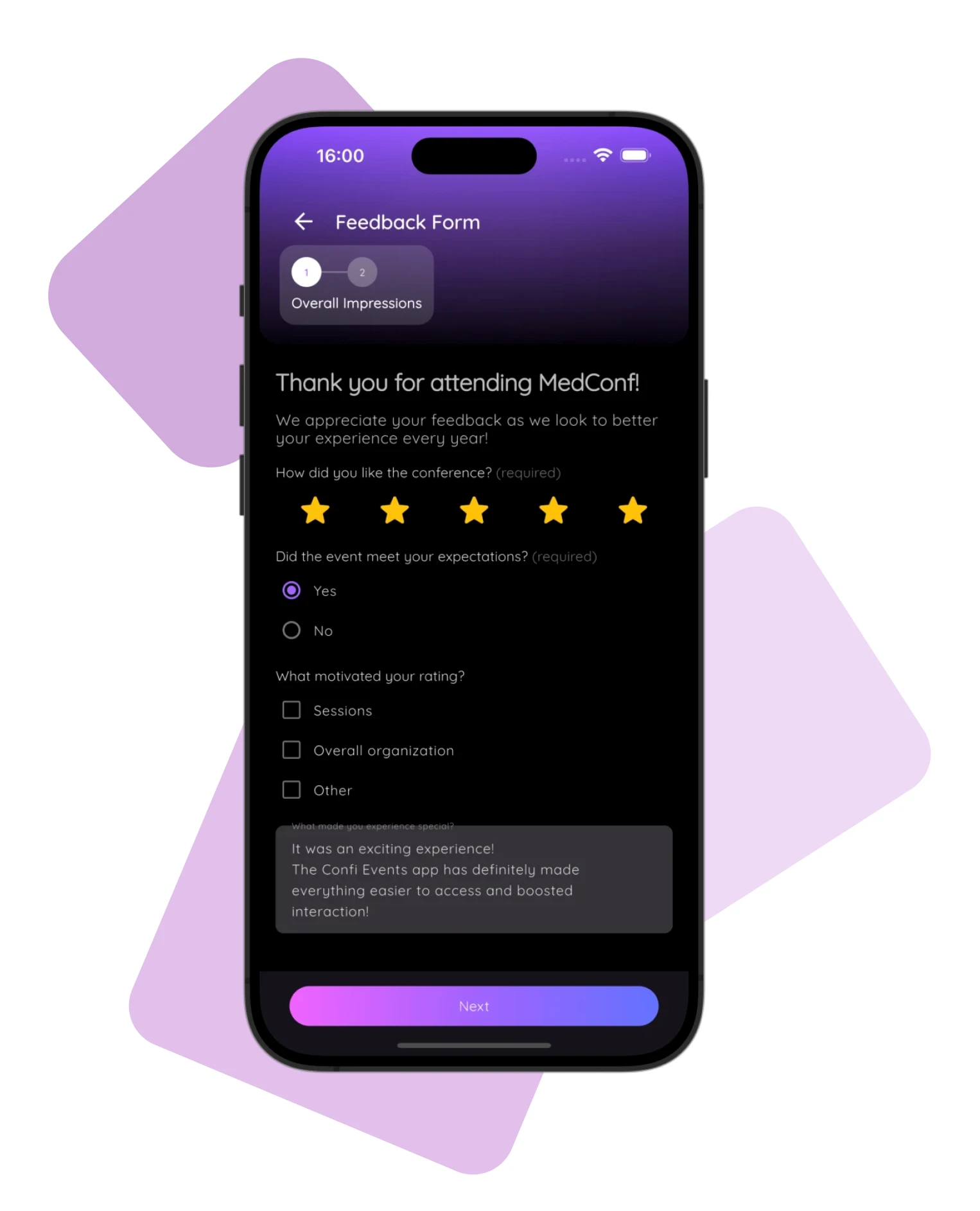
Overall satisfaction — a star rating gives you a headline number you can track across events
Session or content quality — another rating, session-specific if your event has multiple tracks
Did the event meet your expectations? — a single-choice question with a clear answer you can trend over time
What would you improve? — a single open text field; this is where your most actionable feedback lives
Would you recommend this event? — your net promoter signal; use a rating scale and watch this trend from event to event
For Speakers
Speaker feedback is worth collecting separately — their experience of the event is completely different from an attendee's. A short post event survey for speakers covers session flow, AV and tech support quality, and whether they felt the audience was engaged. A final yes/no on whether they would speak at the event again gives you a reliable signal on which speakers to re-invite.
Where to Place the Form
Where your feedback form lives in the app determines who sees it and when — and that has a direct impact on your response rate.
Standalone screen— a dedicated feedback form that appears as its own item in your app's navigation. This works well for whole-event satisfaction forms: visible to every attendee, accessible at any point during or after the event.
Embedded in a custom screen — a form placed inside a custom screen alongside other content, such as session resources or workshop materials. This is the right approach for session-specific feedback: the form appears in context, right next to the content attendees are already engaging with.
Public form — a form accessible without signing in to the app. Useful for post-event outreach to attendees who may no longer have the app installed, or for collecting input from non-registered guests.
For multi-track events like the Zühlke Camp corporate event, embedding a separate feedback form on each session screen means attendees submit their ratings in context — directly after engaging with session content — without any separate prompt required.
How to Set Up an Event Feedback Form in Confi
Building a conference feedback form in Confi takes a few minutes from the admin portal. Here is the process step by step.
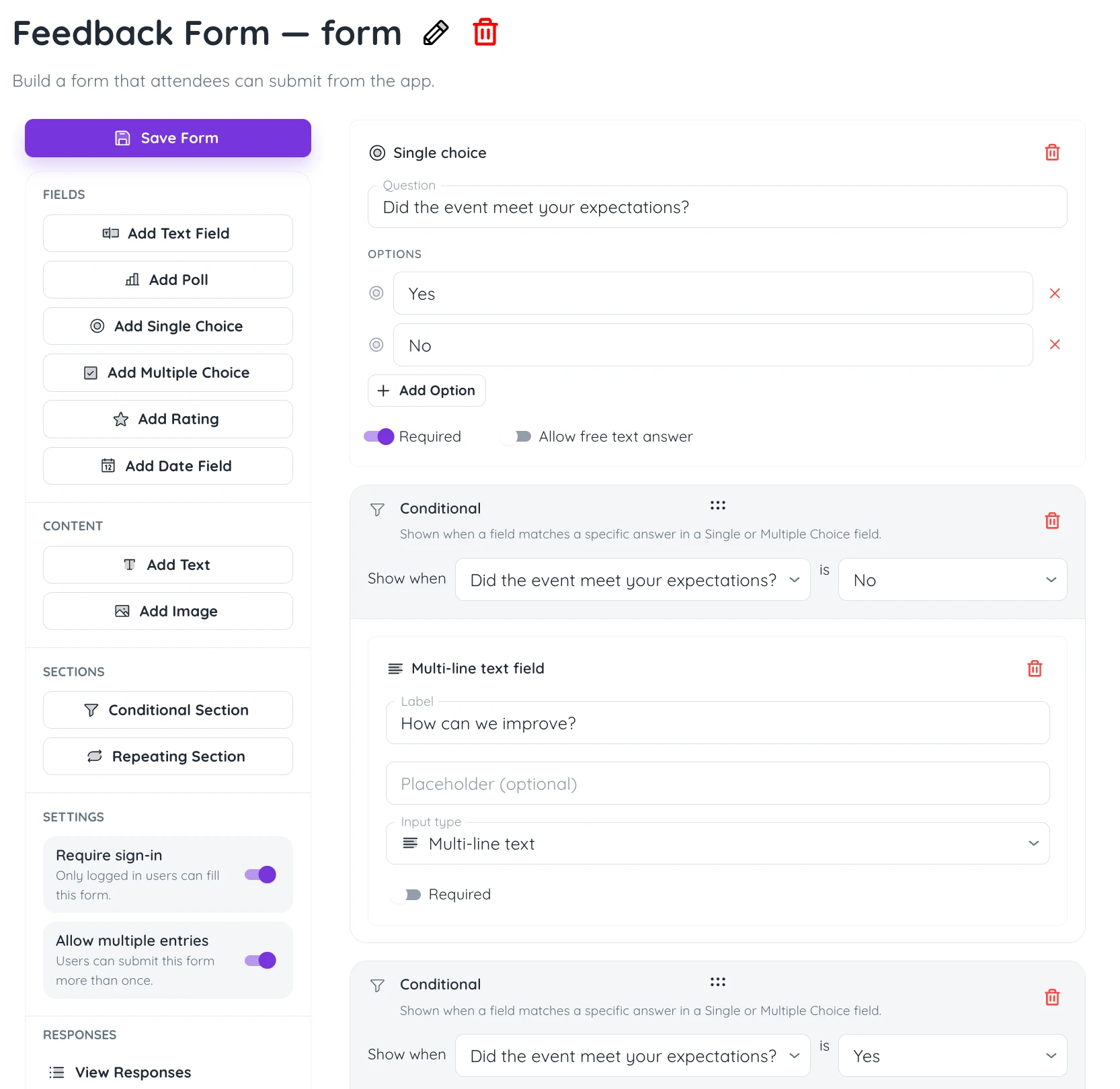
Create a new form — in the Confi admin portal, navigate to your event and open the Forms section. Give the form a clear name.
Add your question fields — choose from text fields, rating questions, single choice, multiple choice, polls, and date fields. Add content text or image blocks to provide context between questions if needed.
Use sections for longer forms — add conditional sections that appear only when a previous answer matches a condition, or repeating sections for collecting multiple entries of the same type.
Configure settings — toggle Require sign-in to tie each response to a specific attendee. Disable Allow multiple entries to prevent duplicate submissions — this also enables sign-in automatically.
Assign to a screen and go live — publish as a standalone screen or embed inside a custom screen. Share the direct link or display the QR code on slides and signage.
For multi-session events, Confi supports multi-page forms with a progress indicator in the app bar — so attendees always know how far through the form they are.
Reading the Results: Stats, Responses, and Excel Export
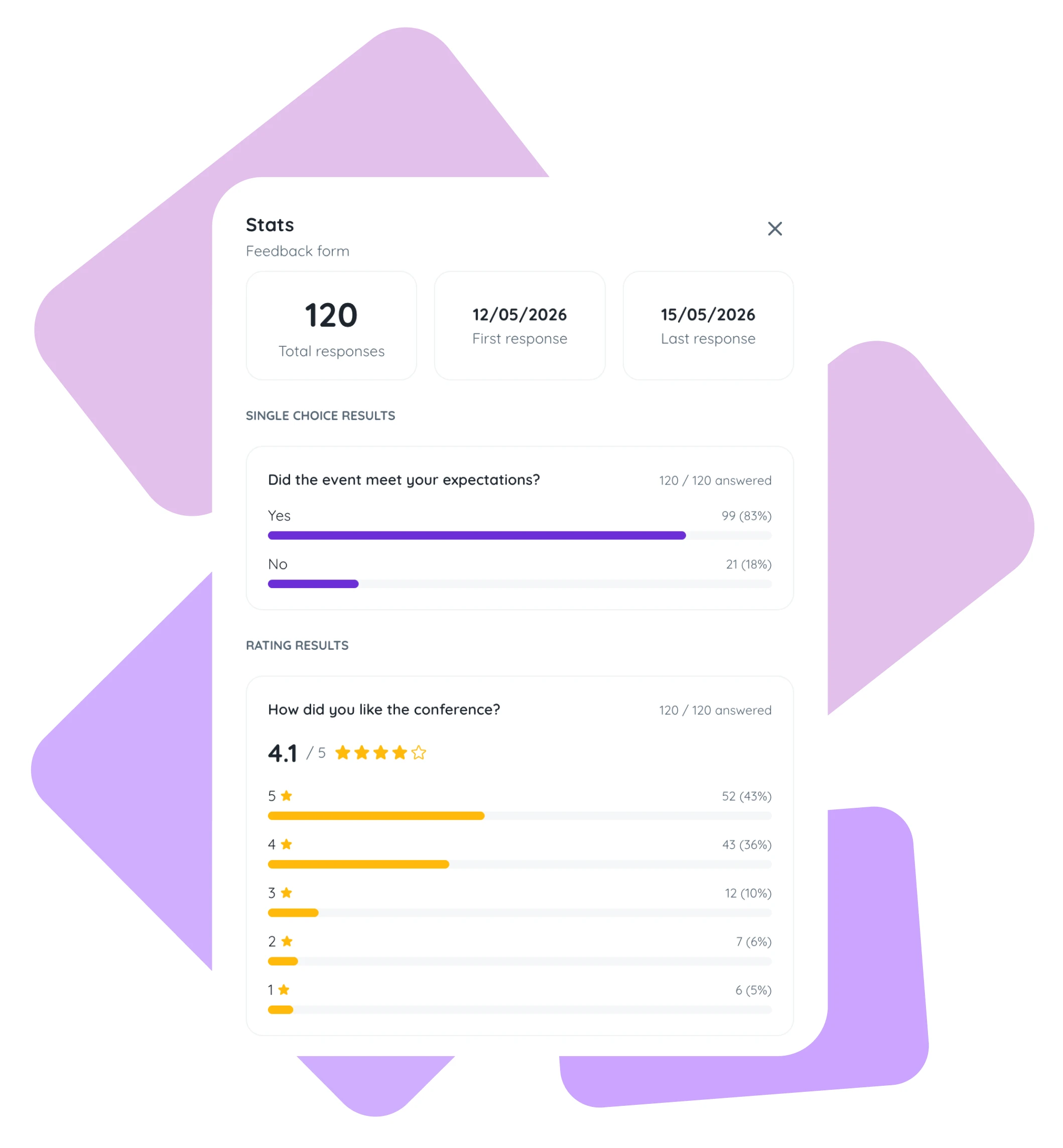
Collecting feedback is only half the job. From the form's sidebar in the admin portal, you have three views to work with.
View responses — a list of individual submissions with a response count badge. Click any row to read the full submission from that attendee.
View stats — aggregate charts per question: rating distributions, poll breakdowns, and choice summaries across all responses.
Export to Excel — download all responses as a spreadsheet for deeper analysis, sharing with your team, or archiving after the event.
The stats view is your fastest signal straight after the event: pull up the aggregate charts, spot the sessions that scored below average, and you have your agenda for the post-event debrief. The Excel export handles anything more granular — slicing by session track, attendee type, or speaker for patterns that aggregate charts won't show you. You can see a similar approach in how session-level data from poster sessions gives organisers specifics that overall satisfaction scores miss.
Getting More Responses — What Actually Works at Live Events
Response rate is a function of friction and timing. Cut the friction, hit the right moment, and you will get more useful data from the attendees you have.
Keep it short — five to seven questions is the ceiling for a live event feedback form. Every additional question costs you completion rate.
Put the QR code on the closing slide— display the form's QR code on the final slide of each session. Attendees can scan it while they're still in the room, before the conversation moves on.
Send a push notification at close — trigger a notification when the event wraps up. An in-app prompt at the right moment outperforms a follow-up email sent hours later.
Don't wait — aim to have the form open and shared within two hours of the event ending. Feedback quality drops sharply when people fill it in the next morning.
Frequently Asked Questions
What questions should be on an event feedback form?
An event feedback form should include an overall satisfaction rating, a session-specific rating if your event has multiple tracks, a single question asking what attendees would improve, and an NPS-style question asking whether they would recommend the event. Keeping the form to five to seven questions gives you enough data to act on while keeping completion rates high.
When should you send a post-event feedback form?
Send a post-event feedback form within one to two hours of the event ending — while the experience is still fresh. In-app feedback forms sent via push notification immediately after a session close consistently achieve higher response rates than email links sent the following day, because they meet attendees in the app they are already using rather than asking them to switch contexts.
How do you increase response rates on event feedback forms?
Three moves reliably increase response rates on event feedback forms: keep the form under seven questions, display a QR code on the final slide of each session so attendees can scan and open it immediately, and send a push notification at event close rather than an email the next day. In-app forms remove the friction of switching apps, which is the most common reason mobile feedback rates exceed email-based alternatives.
What is the difference between a feedback form and a survey?
An event feedback form is purpose-built for a specific event or session — short, time-bounded, and targeted at a known attendee list. A survey is a broader research instrument with no single context, often longer and sent to a wider or external audience. Use a feedback form immediately after each session or event; reserve longer surveys for periodic research about your event programme overall.
How do you analyze event feedback data?
Start with aggregate scores: what is the average satisfaction rating across all sessions? Then identify outliers — which sessions scored significantly above or below average and why. Export all responses to Excel for deeper analysis by attendee type, session track, or speaker. Review open-ended text responses for patterns in what attendees found most and least valuable.
If your event also needs registration forms and QR ticket delivery, Confi's event registration and ticketing features handle the full attendee flow from sign-up to check-in.
Ready to collect feedback attendees will actually submit?
Get in touch
© 2025. All rights reserved